According to GoCodes Asset Tracking, “Preventive maintenance is the routine, scheduled maintenance that occurs based on recommendations from the Original Equipment Manufacturers or by industry experts. It helps prolong the lifecycle of an asset and helps to ensure user safety as well as legal compliance.”
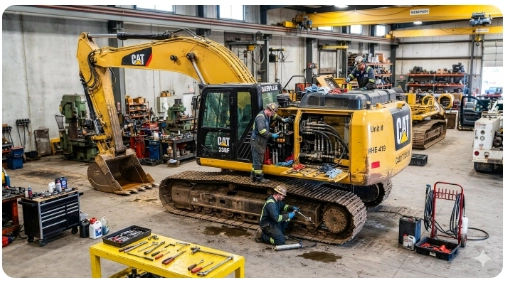
While the long-term benefits are substantial, upfront preventive maintenance costs can accumulate quickly. Consider a large hydraulic excavator, which is commonly utilized in municipal and pipeline projects. This type of heavy equipment requires a rigorous, multi-tiered maintenance schedule to remain operational:
- Daily: Removal of debris and mud, inspections of hardware and components, fluid leak detection around top and bottom rollers, and lubrication to prevent dry joints.
- Weekly: Inspection of excavator track tension and tightening of track bolts.
- Every 1,000 Hours: A rigorous physical audit conducted by a certified technician.
According to K38 Consulting, annual preventive maintenance costs “run about 15% of the machine’s purchase price.” Given that a new, large hydraulic excavator can cost anywhere from $250,000 to $500,000, executing a proper preventive maintenance strategy requires an annual budget between $37,500 and $75,000.
In this article...
The True Cost of Reactive Maintenance
To bypass these upfront costs, some organizations disregard original equipment manufacturer (OEM) recommendations and adopt a reactive “run-to-failure” approach. While this strategy may temporarily eliminate asset downtime and reduce expenses when equipment is brand new, it becomes highly problematic over time. Regular inspections identify minor wear before it escalates; without these interventions, minor issues inevitably result in catastrophic component failures. Consequently, reactive maintenance costs typically range from 300% to 400% more than planned preventive repairs.
This financial impact is clearly illustrated in the Excavator Maintenance and Inspection Guide for Fleets (2026), which notes that repairing a major hydraulic excavator failure costs an average of $95,000. Crucially, the guide highlights that up to 80% of these failures are entirely preventable through basic daily inspections. Conversely, implementing a structured preventive maintenance schedule reduces overall maintenance expenditures by 12% to 18%, according to data from Brightly (a Siemens company).
Operational and Safety Advantages
Beyond direct financial savings, preventive maintenance yields critical operational advantages:
- Minimized Downtime: Unplanned asset downtime directly compromises crew productivity and project timelines. Research from IndustryWeek and Emerson indicates that unplanned downtime costs global industries an estimated $50 billion annually. Within the construction sector specifically, ForConstructionPros.com reports that unplanned downtime rates frequently reach 20% to 30%, identifying a failure to execute preventive maintenance as the primary catalyst.
- Enhanced Workplace Safety: Neglecting maintenance schedules poses a direct threat to personnel. A study by the Society for Maintenance and Reliability Professionals revealed that worker injury rates spike significantly during periods of maintenance non-compliance. In contrast, robust preventive maintenance programs correlate with lower absenteeism, reduced worker compensation costs, and improved employee well-being.
While preventive maintenance cannot completely eliminate the risk of unexpected mechanical failures, it remains the most reliable strategy to optimize asset productivity, protect workforce safety, and control operational expenditures.

How GoCodes Asset Tracking Streamlines Your Preventive Maintenance
Managing complex maintenance schedules for heavy machinery requires precision, and that is exactly where GoCodes Asset Tracking helps. GoCodes Asset Tracking provides a unified, automated, and mobile-friendly platform designed to simplify tracking, scheduling, and logging maintenance tasks.
By leveraging heavy-duty QR code tags and centralized asset tracking software, GoCodes Asset Tracking allows field crews to view maintenance logs, update inspection statuses, and report mechanical issues instantly from any smartphone. The system automatically schedules recurring OEM service reminders, tracks technician certifications, and archives legal compliance documents in a single secure database. By replacing manual paperwork with automated digital tracking, GoCodes Asset Tracking ensures your fleet stays compliant, prevents costly unplanned downtime, and maximizes the operational lifespan of your critical assets.
Implementing GoCodes Asset Tracking for Preventive Maintenance
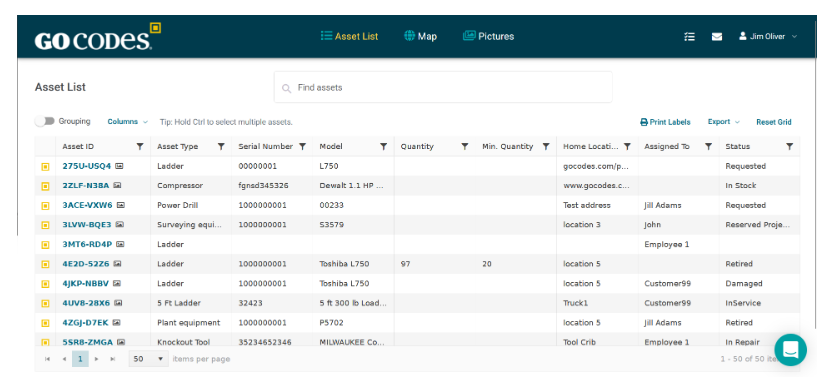
Label every asset you own with a QR code and enter your asset information into the GoCodes Asset Tracking’ asset list. Ensure that every asset has the following information:
| Field | Example |
|---|---|
| Asset name | Air Compressor 12 |
| Category | Compressor |
| Location | Warehouse A |
| Serial / model | Ingersoll Rand XYZ |
| Assigned owner | Maintenance Team |
| Purchase date | 2022-04-15 |
| Warranty expiration | 2027-04-15 |
| Maintenance interval | Monthly / quarterly / annual |
| Criticality | Low / medium / high |
For each asset, you can set up recurring maintenance tasks that may be requested as daily inspections, weekly safety checks, monthly calibrations, quarterly servicing, and annual tasks, with recurring task creation, due-date tracking, alerts, and a calendar view.
| Asset type | PM task | Frequency |
|---|---|---|
| Vehicles | Oil change / inspection | Every 3 months or mileage-based |
| Compressors | Filter change / leak check | Monthly |
| Ladders | Safety inspection | Quarterly |
| HVAC units | Filter replacement | Monthly |
| Fire extinguishers | Inspection | Monthly / annual |
| Calibration tools | Calibration check | Annually |
To create a work order called a ’task’ for any asset in GoCodes Asset Tracking simply:
1. Login to your GoCodes Asset Tracking account.
2. Click on the ID of the asset that you want to work with. The Asset Detail screen will show you all the information that’s been inputted for the asset.
Source: GoCodes Asset Tracking
3. Scroll down the screen until you see the word ‘Tasks.’ You’ll notice that beside the text ‘Tasks’ there is a plus sign + and the word ‘Add’.
Source: GoCodes Asset Tracking
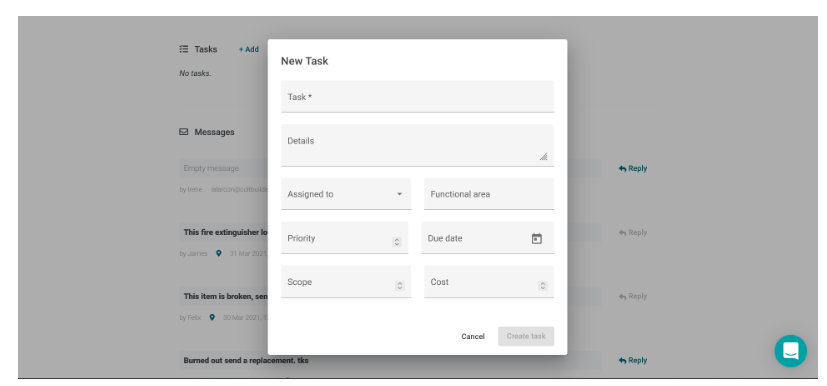
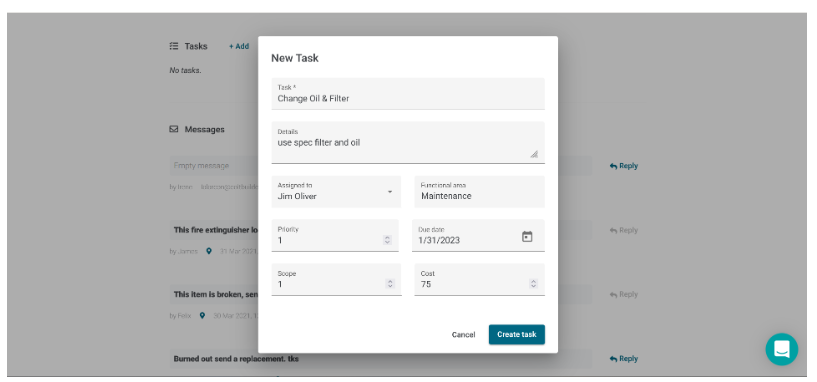
4. Click ‘Add’ and this will create a new, blank task. Then enter the task that is needed for the asset. We have provided ten fields, but you may only use one.
Source: GoCodes Asset Tracking
5. Click the button entitled ‘Create’ to create the new task. Once your task has been created, you can update the task information at any time.
To Update a Task
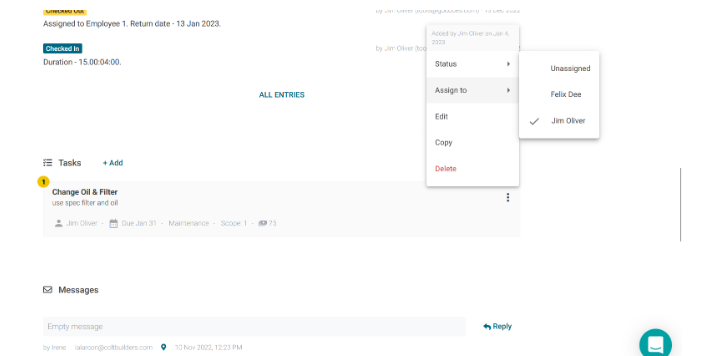
Click the 3 vertical dots you can see to the right of the task. You have the choice to update the Task Status, to Assign the task to a specific person, or to Edit, Copy, or Delete the task.
Source: GoCodes Asset Tracking
My Tasks and All Tasks Tabs’ Views
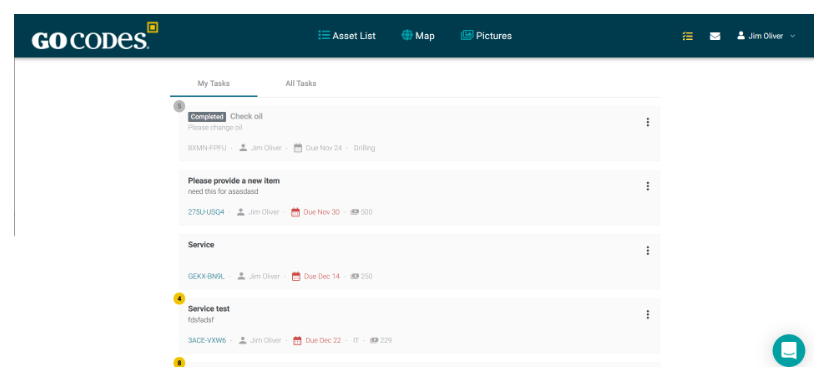
A further feature we include at the top right of the screen is the My Tasks and All Tasks Tab views. The My Task view provides you with a summary of all the tasks that you have been assigned. The All Tasks’ vew provides a list of all of the tasks for your organization’s account.
– Find the checklist icon at the top of the screen located towards the right side.
– Click the icon to access the My Tasks and All Tasks’ tabs views.
Source: GoCodes Asset Tracking
Track Service History by Asset
For audits, warranty claims, safety compliance, or resale value, GoCodes Asset Tracking enables your team to access an asset’s complete maintenance history instantly. Now you can see who did what and where to the asset for full compliance and accountability.
| History item | Why it matters |
|---|---|
| Date serviced | Compliance and PM proof |
| Technician | Accountability |
| Work performed | Service record |
| Photos | Proof of condition |
| Parts used | Cost tracking |
| Labor hours | ROI and budgeting |
| Notes | Future troubleshooting |
| Next due date | Planning |

Build Dashboards and Reports
GoCodes Asset Tracking also includes custom reporting among its asset tracking features. You can build a range of reports for your use that will provide valuable insights about preventative maintenance for your admin team.
Track a few core KPIs:
| KPI | What it tells you |
|---|---|
| PM completion rate | Are scheduled tasks getting done? |
| Overdue PM count | Where are you falling behind? |
| Maintenance cost by asset | Which assets are expensive to maintain? |
| Downtime by asset | Which assets hurt operations? |
| Labor hours by category | Where technician time is going |
| Repairs vs. preventative tasks | Whether PM is reducing breakdowns |
| Assets with no recent service | Risk and compliance gaps |
Bottom line
Implementing a preventative maintenance process makes good business sense. Use GoCodes Asset Tracking to make that process effective, ensuring equipment is well maintained for minimum downtime and maximum usage.
For reference
1 https://k38consulting.com/the-truth-about-construction-equipment-costs/
1 heavyvehicleinspection.com/blog/post/excavator-maintenance-inspection-guide
1 www.brightlysoftware.com/blog/the-roi-of-preventive-maintenance-is-it-really-worth-it
1 exchange.smrp.org/blogs/robert-latino/2019/01/23/is-there-a-direct-correlation-between-reliability?hlmlt=VT