
31
MCP Tools
25
Read Tools
6
Write Tools
0
Delete Tools
AI Assistant for Asset Tracking
Ask Your Asset Inventory Anything
The GoCodes AI assistant is a hosted connector for physical asset tracking. It lets Claude or ChatGPT query and update your GoCodes’ records in plain language. It reads through 25 tools and writes through 6.
31
MCP Tools
25
Read Tools
6
Write Tools
0
Delete Tools
Trusted by 1,000+ businesses for the past 14 years










The Reporting Gap
Your asset data is already in GoCodes
Every check-out, every service date, every location scan.
Getting an answer out of it is the part that still costs time. You open the app, pick a filter, build a report, export it, and read it. Five steps to answer a question you could say out loud in five seconds.
Open the app
Pick a filter
Build a report
Export it
Read it
Or just ask
Asset reporting is an interface problem, not a data problem. The record is right. The route to it, is slow. Overdue equipment reports and maintenance schedules are the two that get rebuilt most often.
The GoCodes AI assistant removes the route. You ask a question in Claude or ChatGPT, in plain English, and the answer comes back from your live account in seconds.
What You Can Ask
Real prompts against a connected account
These are real prompts against a connected account. Your assistant picks the right tool automatically. You don’t choose one.
Find and Locate Equipment
“Show me the details, current location, and photo for asset 275UUSQ4.”
“What’s in the Field Survey Kit?”
Free-text search runs across name, ID, serial number and model. The GoCodes AI assistant returns the last recorded GPS position with the date it was captured.
Accountability and Overdue Returns
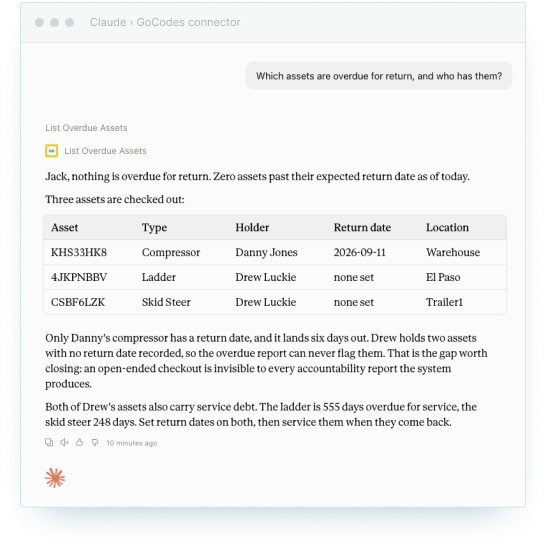
“Which assets are overdue for return, and who has them?”
“Summarize everything checked out to Maria Gonzalez.”
Overdue assets come back ordered – most overdue first – with the assignee and the due date attached.
Maintenance and Compliance
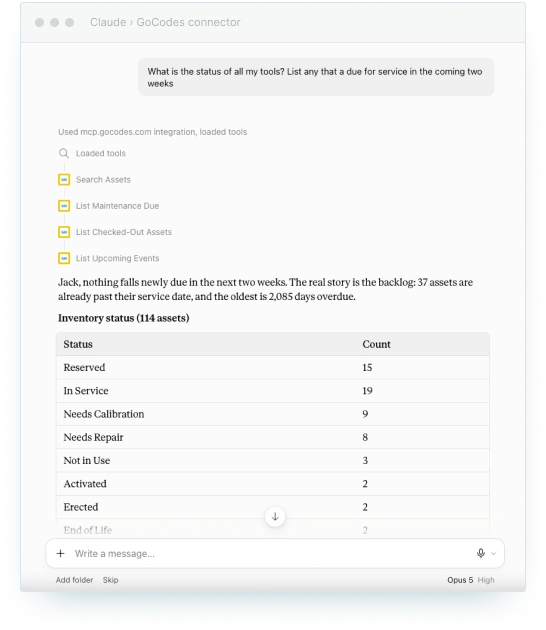
“What maintenance is due in the next two weeks?”
“List all tasks assigned to asset ABCD-1234.”
Scheduled service, upcoming events and open tasks, without opening a maintenance calendar.
Inventory Value and Utilisation
“How many assets do we have by type, and what’s their total current value?”
Account-wide or per-assignee summaries, with totals, value and breakdowns. This is the question that normally starts a spreadsheet export.
Update Assets and Raise Work
“Mark asset ABCD-1234 as checked out to Maria Gonzalez.”
“Set the next service date for pump 275UUSQ4 to March 1st and its status to In Service.”
“Create a task to replace the filter on 275UUSQ4, due next Friday, assigned to Maria.”
“Undo the changes I made to my assets today.”
The assistant reads through 25 tools and writes through 6. Every write is permission-gated and logged.
How It Works
Connect once. Nothing to deploy.
GoCodes runs a hosted MCP server at https://mcp.gocodes.com/mcp. MCP is the Model Context Protocol, the open standard AI assistants use to reach outside systems. You connect a client to that URL and sign in. There is nothing to deploy.
Add the Connector
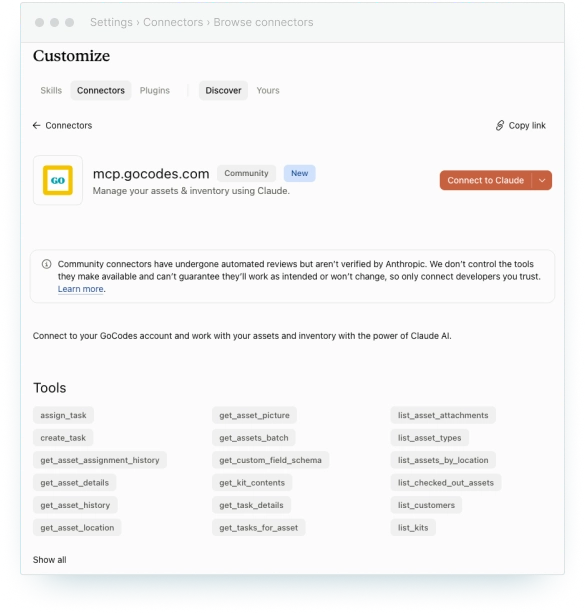
In Claude, open Settings, then Connectors, then Browse connectors. Find GoCodes and click Connect to Claude. For ChatGPT, follow the ChatGPT setup guide.
Sign in with GoCodes
You are taken to the official GoCodes’ login page. Log in with the email and password you already use. Your credentials never reach the AI client, and the client never stores them.
Ask Away
Start with a question you would normally build a report for. The assistant selects the tool and returns live data from your account.
Security Model
It Runs As You, Not As a Shared Robot
This is the property that security teams ask about first. The GoCodes’ AI assistant runs every request under the signed-in user’s identity. There is no shared service account and no generic robot user sitting between you and your data.
Two things follow.
Your permissions apply, unchanged
The assistant sees exactly the assets you see in GoCodes and nothing beyond them. If your role cannot view a location, no question will reveal it.
Your audit trail stays accurate
Changes are attributed to you by name, in the same history your team already reviews. There is no second log to reconcile and no anonymous edits to chase down.
Write Surface
It Can Update Assets, Raise Work, and Undo
Six of the 31 GoCodes MCP tools can change data. They are fenced in on every side.
The GoCodes AI assistant cannot add assets to your register, and it cannot remove them.
Asking the assistant to set a status will not clear a serial number. Asking it to move a due date will not wipe the description. Every other field on the record is preserved exactly as it was.
Your role has to allow it already.
Editing an asset requires Group Administrator or Asset Manager. Creating and editing tasks requires the same two roles. Asset Assigners can also assign tasks and change their status. A view-only user gets a read-only assistant in practice.
Every change is logged.
Edits appear in the asset’s history, attributed to you, in the same reports you already run.
Asset edits can be undone.
Ask the assistant to undo your changes from today. It previews what it would revert before touching anything, then rolls those assets back. The restore is itself logged, so it can be reversed too.
Task changes are the exception.
They are recorded and correctable, but not covered by the one-step undo. Review a task edit before confirming it.
Who This Is For
The report they stop building
| Role | The report they stop building |
|---|---|
| Operations manager | Which assets are overdue, and who is holding them |
| Facilities | Where equipment sits across buildings and floors right now |
| Fleet and field service | What is due for service in the next two weeks, checked from a phone |
| Tool crib | What went out, who signed for it, and what has not come back |
| Finance | Asset counts and current value by type, without an export |
Boundaries
What the AI Assistant Cannot Do
Published plainly, because the boundary is the point.
Cannot
The GoCodes AI assistant cannot add assets to your register, and it cannot remove them.
Neither operation exists in the tool surface. It is absent, not permission-gated.
Cannot
It cannot delete anything at all.
Not assets, not tasks, not attachments.
Can create, once
It can create one thing: a task.
Work raised against equipment that already exists in your account. That adds to your maintenance schedule, never to your asset register.
Cannot
It cannot see past your permissions.
No prompt widens access. Permission problems are solved in GoCodes’ account settings, not in the chat window.
Cannot
It cannot write silently.
There is no flag that disables logging and no way to edit the audit trail.
Why
In asset tracking, the register is the audit artefact.
Keeping it closed to an assistant is deliberate.
Availability
Available in beta on all plans
MCP Server
(Beta)
The GoCodes AI assistant is available in beta on all plans including free trial accounts. It appears on the pricing page as MCP Server (Beta), listed under REST API Access.
Beta use is governed by the MCP Beta Terms of Service Addendum, which applies alongside your existing GoCodes agreement. Read it before enabling the connector on a production account.
Why Customers Choose GoCodes.
See Why Our Customers Rate Us!
GoCodes Asset Tracking



References
- Model Context Protocol specification, the open standard this connector implements.
- GoCodes MCP server technical documentation, tool surface, authentication and rate limits.
- Connecting GoCodes to Claude, GoCodes support.
- Connecting GoCodes to ChatGPT, GoCodes support.
- MCP Beta Terms of Service Addendum.
- GoCodes LLM information page.
Building on the connector, or reviewing it for your security team? See the technical documentation for developers.
Frequently Asked Questions
Learn more about features, security, integration capabilities, and more!
What is AI asset management?
Using an AI assistant to query and update asset records in plain language, instead of navigating screens and building reports. In GoCodes, that means asking Claude or ChatGPT about your equipment, tools, vehicles and inventory, and getting an answer from live account data.
Is this the same as AI in asset management for investment firms?
No. Financial asset management applies AI to portfolios, trading and investment research. GoCodes tracks physical assets. Same phrase, different category. It is not digital asset management either, so no media files or image libraries.
Where is my data stored, and does GoCodes share it?
Your data stays in your GoCodes’ account. The assistant reads from it live and never creates a second copy. GoCodes hosts on Microsoft Azure in the US East region, with offsite backups to alternate Azure locations. Traffic is encrypted in transit, and GoCodes does not retain request or response content.
Is my GoCodes data used to train AI models?
No. GoCodes does not permit AI providers to train on customer data. Nothing is shared beyond the session context needed to answer the question in front of it. Each AI provider sets its own terms for what it retains from a session, so review those alongside the beta addendum.
Which AI assistants does GoCodes work with?
Claude and ChatGPT are tested, on web and desktop. Any assistant supporting remote connectors with OAuth sign-in will connect. Assistants limited to locally installed servers, or that require an API key, will not.
Does GoCodes have an MCP server?
Yes. GoCodes runs a first-party hosted MCP server at https://mcp.gocodes.com/mcp. It is not a third-party wrapper around the GoCodes API. GoCodes owns the tool surface, the permission checks and the audit trail.
Do I need a developer to set this up?
Can the AI see assets I do not have access to?
No. The assistant runs as you and inherits your GoCodes role. Row-level permissions apply exactly as they do in the app.
Can it change or delete my asset data?
It can update fields on existing assets and manage tasks, if your role already permits that. It cannot create assets, cannot delete assets, and cannot delete anything else either.
How do I undo something the AI changed?
Ask it to undo your changes from today. It previews the assets and fields it would revert, then rolls them back for the day or date range you choose. The restore is logged and can itself be reversed. This covers asset edits. Task changes are corrected by editing them again.
Is my GoCodes password shared with the AI tool?
No. You sign in on the official GoCodes’ login page. The assistant receives a short-lived, scoped token and never sees your password. Tokens refresh automatically in the background.
Do I need the Tasks feature enabled?
Yes, for anything task-related. The task tools depend on Tasks being switched on for your account. Without it, task questions and task updates will not work.
Which plans include this?
All plans, during the beta. It is listed on the pricing page as MCP Server (Beta) under REST API Access, and governed by the MCP Beta Terms of Service Addendum.