
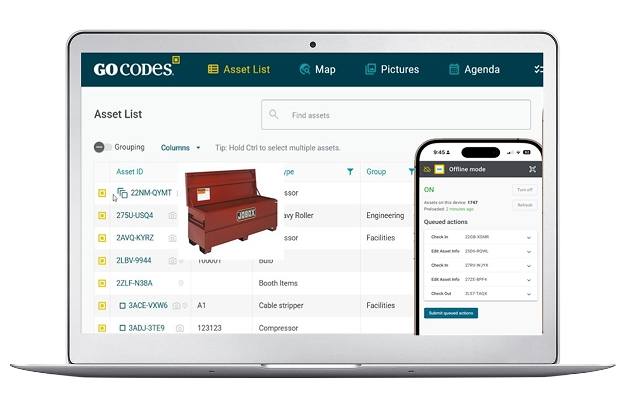
Trusted by 1,000+ businesses for the past 14 years







What Is Mobile Asset Tracking?
Mobile asset tracking lets your team manage equipment directly from their smartphones. Scan a QR code, see exactly what you have, check tools in and out, and update records from anywhere your work takes you.
GoCodes goes further by working completely offline. When your crew is in a basement, on a remote job site, or inside a facility with restricted WiFi, they can still track every asset. Changes sync automatically the moment they reconnect.

Web Browser Access
Works on any device with a browser. No installation needed.

Native iOS and Android Apps
Optional dedicated apps for teams who prefer them.
Full Offline Mode
Complete asset updates without an internet connection.
How it Works
How Mobile Asset Tracking Works
From the field to the cloud in four simple steps. Your team tracks assets while GoCodes handles the technology.

Scan the QR Code
Point your phone camera at any GoCodes label. Works with QR codes, barcodes, or NFC tags.
View Asset Details
See complete information, history, documents, and photos instantly on your screen.

Update Information
Update asset data, Check in/out, add notes, update location. All changes saved locally when offline.
Automatic Sync
Reconnect to the internet and all changes upload automatically. Nothing manual required.
Built for Teams Who Work Where WiFi Does Not
Offline asset tracking designed for real work environments.

Construction Sites
Track tools and equipment across job sites, in basements, and inside buildings under construction where cell service is spotty.
Remote Locations
Mining operations, oil fields, rural infrastructure projects. Manage assets miles from the nearest cell tower.
Field Service
HVAC, plumbing, electrical. Technicians track inventory in their trucks and update records between service calls.
Compliance Audits
Complete equipment audits in secure facilities, server rooms, and locations where WiFi access is restricted.

Multi Site Operations
Teams moving between locations can track assets continuously without worrying about connectivity gaps.

Equipment Rental
Check equipment out to customers at any location. Record condition, capture signatures, track returns.
Key Features
Mobile Features Built for the Field
Every feature designed to work seamlessly on any device, with or without internet.
No App Required
GoCodes runs directly in your web browser. Workers can start tracking assets immediately without downloading software, waiting for IT approval, or filling up phone storage. Just open your browser and scan.

Works on iPhone, Android, tablets, and computers
Native iOS and Android apps available optionally
Contractors and temps start immediately
Access Anywhere
Open GoCodes in any browser to track assets. No app store, no downloads, no waiting.
Full Office Functionality
Your asset database syncs to your device automatically. When you lose connectivity, GoCodes keeps working. Scan codes, view complete asset information, check equipment in and out and update records. Everything syncs the moment you reconnect.
Database copy stored locally on your device
All changes queued and synced automatically
Available on Android now, iOS coming soon
No Signal? No Problem
Full functionality even without internet connection
GPS Location with Every Scan
Every time someone scans an asset, GoCodes automatically captures the GPS coordinates along with the date, time, and user. No extra steps. This creates a complete location history, so you always know where equipment was last seen and who had it.
GPS captured automatically with every scan
Complete audit trail of asset movements
View location history on interactive map
Location Captured
37.7749°, -122.4194°
DeWalt Drill DCD771
Last scanned: Today 2:34 PM by Mike Johnson
Building A
In Use
Compare Options
How GoCodes Mobile Compares
See how GoCodes stacks up against alternatives for mobile asset tracking.
Feature
GoCodes
Competitors
Spreadsheets
No app download required
Works 100% offline
Automatic GPS capture
QR code labels included
Unlimited support included
Check in/out tracking
Complete audit trail
GoCodes GPS trackers combine industry leading value with flexible 1 year contracts.
Why Customers Choose GoCodes.
See Why Our Customers Rate Us!
GoCodes Asset Tracking






Articles & Insights
Information to give you more tracking power

9 Best Equipment Tracking Softwares for 2026
The best equipment tracking software platforms for 2026 are GoCodes, Samsara, Tenna, UpKeep, EZOfficeInventory, Sortly, Asset Panda, GigaTrak, and Fleetio. Each platform serves a distinct segment of the market, from QR code scanning for field tools to GPS telematics...

10 Best Asset Tracking Softwares for 2026
In this guide we evaluate the 10 leading asset tracking platforms across multiple categories, from comprehensive hardware and software solutions to specialized IT asset management tools. So whether you manage a construction fleet, warehouse inventory, or enterprise IT...

The Full Guide to Check-In/Check-Out Software
Want to optimize your check-in and check-out process? Let our guide teach you how software can automate and simplify everything.

Asset Optimization: What You Need to Know
Want to understand asset optimization better? This guide covers the what, why, and how to help you take control of your assets.

How to Find Stolen Construction Equipment
Discover how to find stolen construction equipment using modern tracking tools, best practices, and expert tips to boost recovery chances.

We include patented QR code tags that can be customized to your project. They come ready to use with our web software and smartphone scanner apps.
Works on devices you already own
Our FREE scanner apps and tags mean there's no hand-held barcode scanners or printers to purchase – so you’re up-and-running fast.

307 ratings
Apple Mobile App
46 ratings
Android Mobile App

Frequently Asked Questions
Learn more about features, security, integration capabilities, and more!
Do I need to download an app to use GoCodes?
No! GoCodes works directly in any web browser on your smartphone, tablet, or computer. Simply open your browser, navigate to GoCodes and start scanning. We also offer native iOS and Android apps for teams who prefer a dedicated app experience, but they are completely optional.
How does offline mode work?
When you connect to the internet and select offline mode, GoCodes automatically saves a copy of your asset database to your device. When you enter an area without connectivity, you can still scan QR codes, view asset information, check equipment in and out and update details. All changes are stored locally and sync automatically when you reconnect.
Does scanning capture GPS location?
Yes! Every time someone scans an asset, GoCodes automatically captures the GPS coordinates, date, time, and the user who performed the scan. This creates a complete location history for every asset, so you always know where equipment was last seen and who had it.
What happens if two people update the same asset offline?
GoCodes uses timestamps to manage concurrent updates. When both devices reconnect, the system applies changes in chronological order. The complete history of all updates is preserved, so you never lose data. If there are conflicting changes, the most recent update takes precedence while the full audit trail remains available.
Can I use barcode scanners or RFID readers with mobile?
Yes! GoCodes works with QR codes, traditional barcodes, serial numbers, and RFID/NFC tags. You can use your smartphone camera to scan codes or connect Bluetooth barcode scanners and RFID readers for high volume operations. The system is flexible and works with whatever hardware fits your workflow.
How do I get help if my team has questions in the field?
GoCodes includes built-in help bubbles throughout the app, with video tutorials your team can watch without leaving the page. We also provide unlimited phone, email, chat, and Zoom support at no extra cost. If your crew forgets how to do something in the field, help is always one tap away.