
Calibration Management Software
Mobile-First Equipment Calibration and Asset Tracking
GoCodes combines equipment tracking with calibration scheduling, eliminating the chaos of manual spreadsheets and expensive desktop software. Start a FREE trial today!
Trusted by 1,000+ businesses for the past 14 years


The Hidden Cost of Manual Calibration Tracking
Connect equipment tracking and calibration scheduling with GoCodes.
Missed Calibration Intervals Lead to Quality Failures
Tracking Down Calibration Certificates Wastes Hours of Work Time
Inaccurate Documentation Creates Compliance Nightmares
Zero Connection Between Equipment Location and Calibration Status
Expensive Calibration Software that Field Teams Can’t Access.
How GoCodes Calibration Management Works
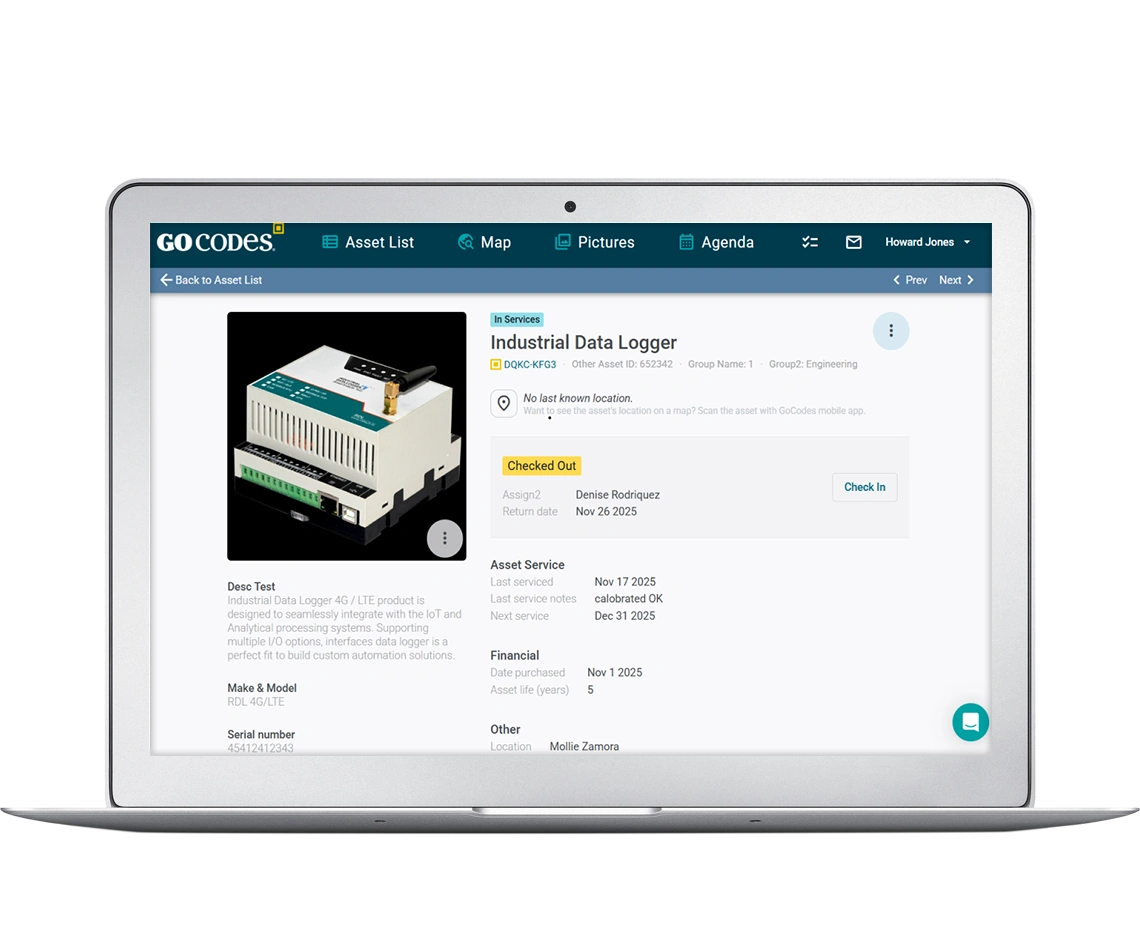
GoCodes unifies equipment tracking and calibration management in one mobile-first platform. Scan any piece of equipment with your phone to see its calibration history, upcoming due dates and stored certificates, whether you’re in the warehouse, on a job site, or in the field.
Core Calibration Management Capabilities
Track Every Calibration-Critical Asset
Attach custom QR code labels to gauges, meters, instruments, test equipment, and any tools requiring periodic calibration. Your team simply scans the labels with their phones. There’s no special scanners needed, no app to install, just the camera they already have.
Each scan shows complete equipment details:
- Calibration due date
- Last calibration date
- Calibration interval
- Responsible technician
- Location history
- Attached certificates
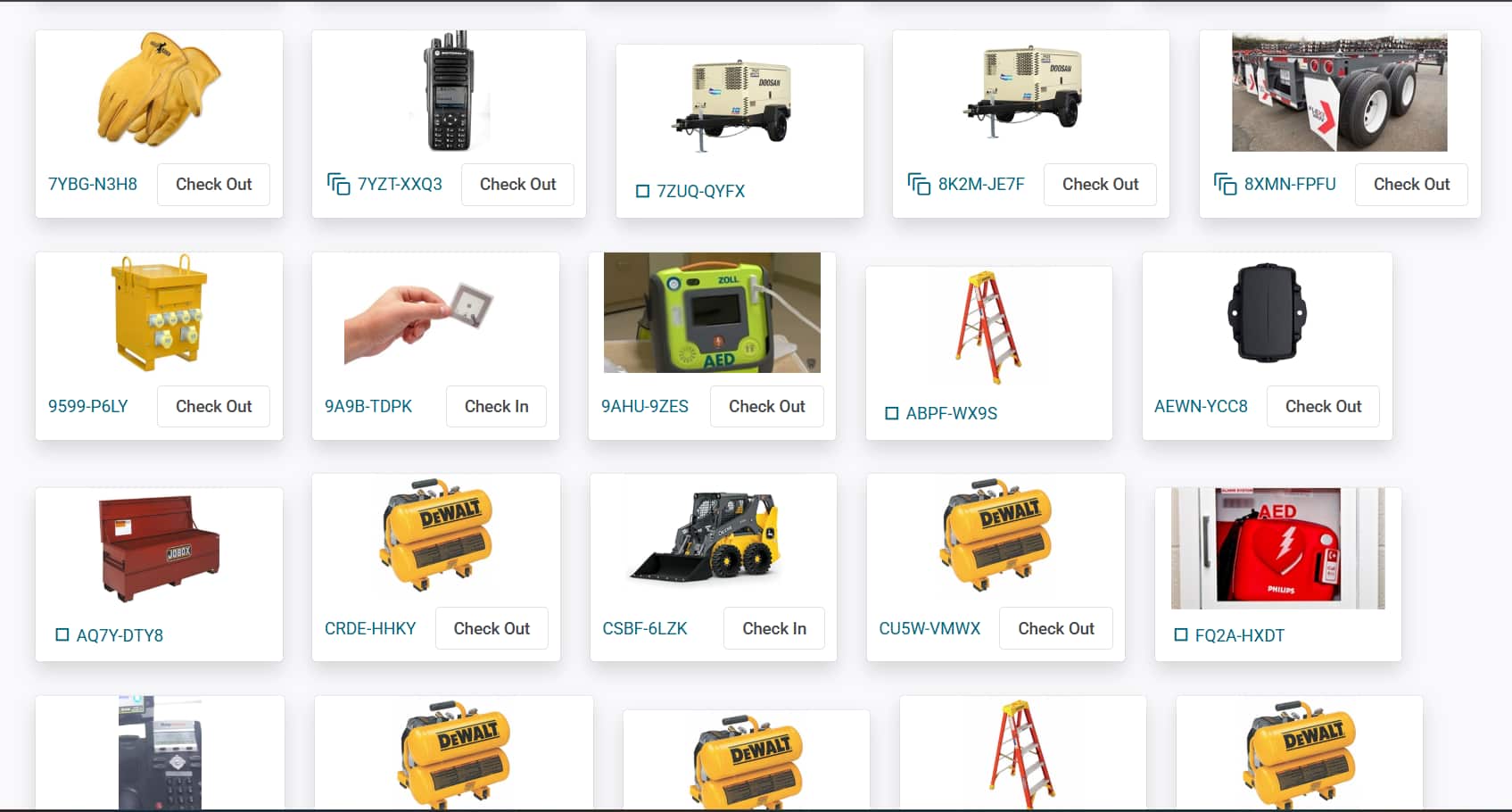
Everything lives in one place instead of scattered across systems. Create custom fields for calibration-specific data like:
- Tolerance specifications
- Accuracy requirements
- Traceability standards and Calibration procedures
- Structure your data exactly how your quality management system requires
Automate Calibration Scheduling and Reminders
Set calibration intervals when adding equipment, 30 days, 6 months, annual, or custom frequencies. GoCodes automatically calculates next due dates and sends reminder notifications before calibrations become overdue.
Email alerts go to quality managers, technicians, and equipment owners at configurable intervals: 30 days before due, 14 days before due, on the due date, and when overdue. You’ll never discover missed calibrations during audits again.
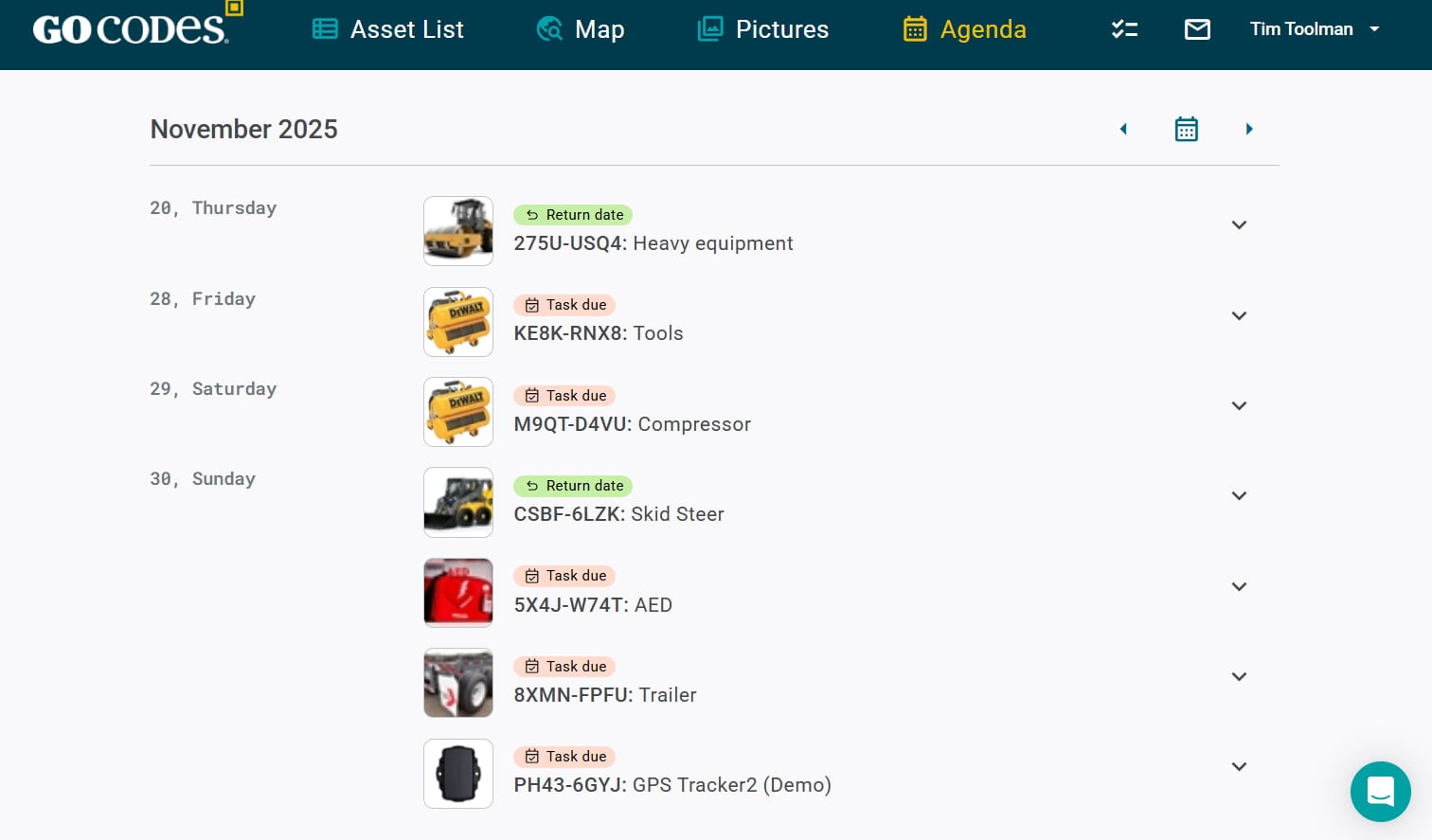
Assign calibration tasks to internal technicians or external calibration laboratories. Track who’s responsible, when work started, and when calibration completed. Maintain accountability across your entire calibration program.
Maintain Digital Calibration Records and Certificates
Upload calibration certificates directly to each equipment record. Scan paper certificates with your phone or attach PDFs from external calibration labs. Every certificate links to specific equipment with date stamps showing when they were uploaded.
During audits, pull up complete calibration history instantly. Show auditors every calibration certificate, who performed the work, when it happened, what the results were and show that all work was completed within schedule.
Store pass/fail results, measurement data, tolerance specifications, and technician notes. Document out-of-tolerance findings and corrective actions taken.
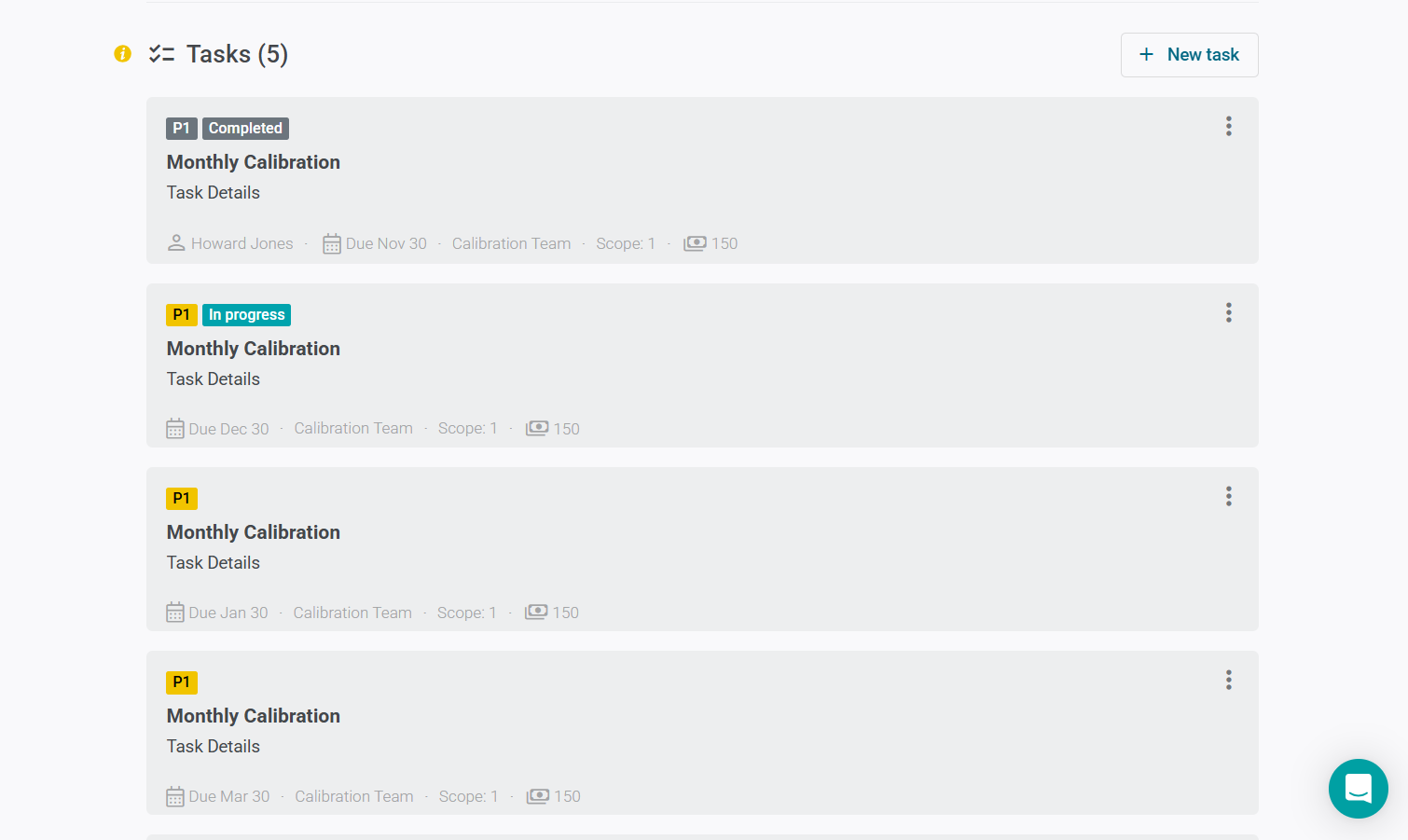
Build the audit trail your quality management system requires.
GoCodes maintains a permanent history, even after equipment disposal. Prove calibration traceability for any equipment that’s ever existed in your system.
Mobile Field Access for On-Site Calibration
Technicians perform calibrations in the field using mobile devices. Scan equipment QR codes to load calibration procedures, tolerance specifications, and historical data. Record measurements, document results, and upload certificates all from your phone.
Offline mode works when connectivity isn’t available. Data syncs automatically when you return to network coverage. Field calibrations no longer require teams to return to the office to update records.
Take photos of equipment condition, measurement displays, or calibration setups. Visual documentation adds context that paper forms can’t capture.
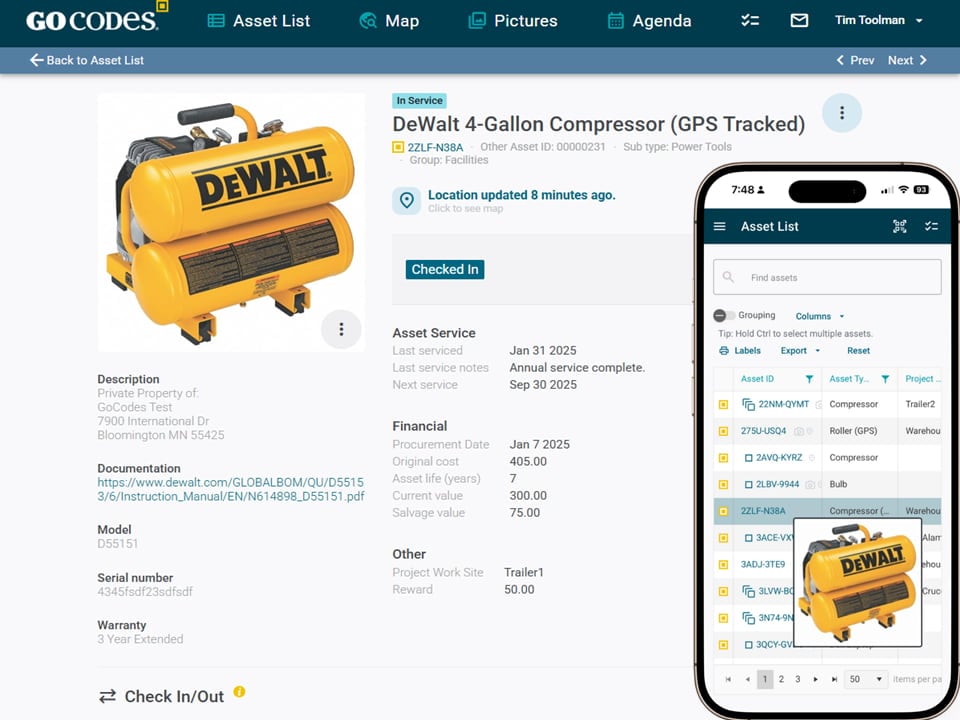
Integration with your Existing Asset Management
If you already track equipment with GoCodes, calibration management integrates seamlessly. Your existing equipment records now include calibration scheduling, certificate storage and compliance tracking. Forget duplicate data entry. Say no to separate systems.
Finally, your equipment that requires calibration, as well as your equipment that doesn’t, can all live in one unified system.
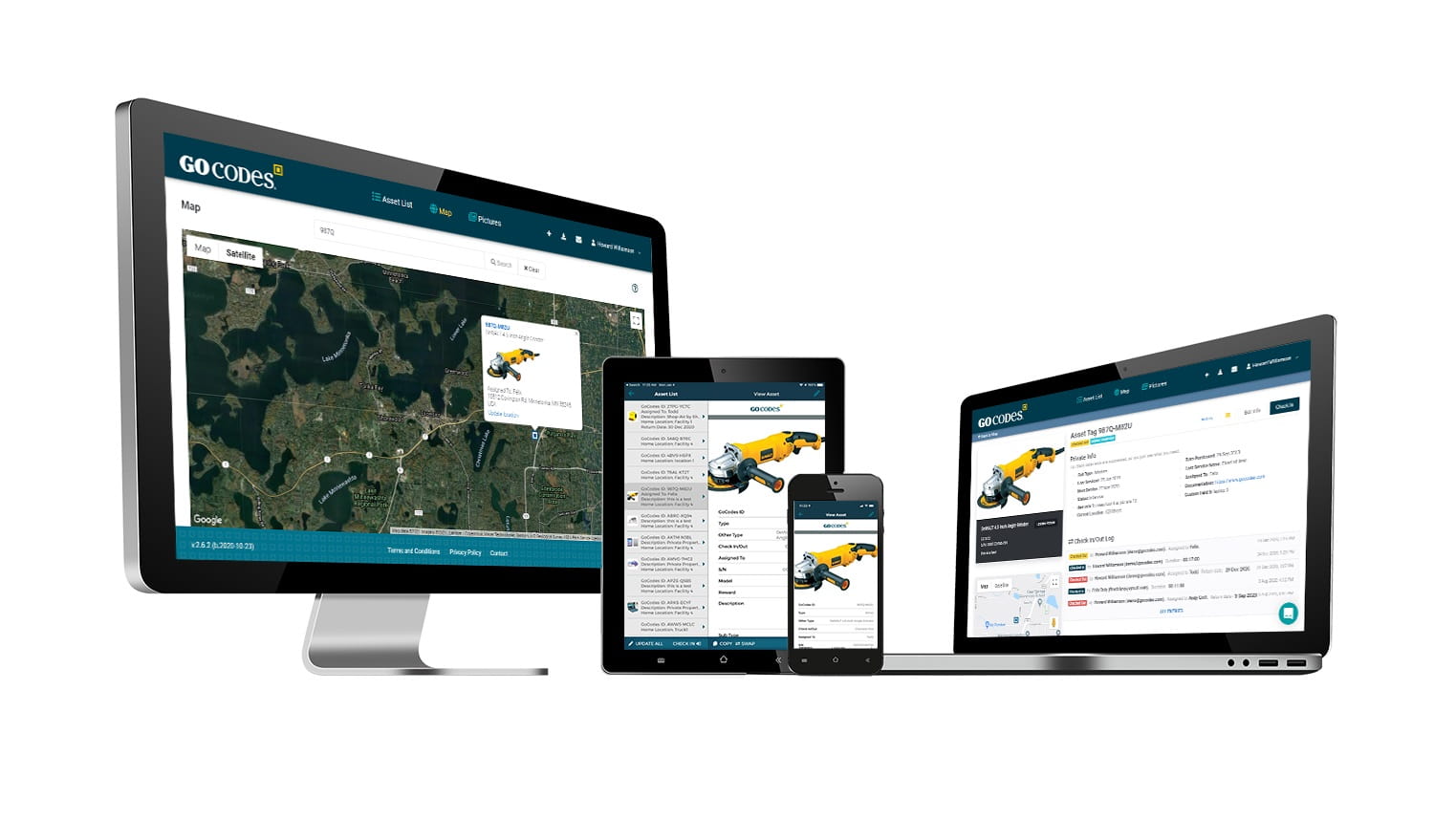
Maintenance teams, operations managers and quality teams can now work from the same platform with role-based permissions controlling what each group can see and edit.
Calibration Management Software Features and Capabilities

Automated Calibration Scheduling
- Calibration intervals for each equipment type
- Automatic calculation of next due dates
- Reminder notifications at multiple intervals
- Overdue flagging with escalation alerts
- Calendar view of calibrations across all equipment

Digital Certificate Management
- Unlimited certificate uploads per equipment
- PDF, image, and document format support
- Mobile scanning of paper certificates
- Automatic date extraction and filing
- Quick certificate retrieval during audits
Calibration History and Audit Trails
- Complete calibration history for every equipment
- Pass/fail results and measurement data storage
- Technician assignment and completion tracking
- Before/after calibration values documentation
- Immutable history for regulatory compliance
Equipment Location and Status Tracking
- Real-time equipment location visibility
- Check-in/check-out functionality
- Location history and movement tracking
- Equipment assignment to people, projects, or locations
- Integration with GPS tracking for mobile equipment

Vendor and Laboratory Management
- Track internal vs external calibration providers
- Maintain calibration lab contact information
- Monitor turnaround times and performance
- Schedule equipment shipments to labs
- Centralize multi-vendor calibration records
Mobile-First Calibration Workflows
- QR code scanning for instant equipment access
- Mobile certificate upload and photography
- Offline data collection with automatic sync
- Field calibration documentation
- No app installation required

Custom Calibration Fields and Forms
- Tolerance specifications
- Accuracy requirements
- Traceability standards and documentation
- Calibration procedures and protocols
- Environmental conditions during calibration
Compliance Reporting and Analytics
- Calibration compliance percentage dashboards
- Overdue equipment reports
- Calibration cost tracking and analysis
- Vendor performance comparisons
- Trend analysis for equipment stability
Why Calibration Programs Fail
And how GoCodes solves each problem

PROBLEM: Disconnected systems create data silos
Traditional Approach
Companies track equipment in one system, manage calibrations in spreadsheets, and store certificates in filing cabinets or shared drives. Quality managers spend hours cross-referencing systems to understand equipment status.
GoCodes Solution
Equipment tracking and calibration management live in one unified platform. Scan any equipment to see its complete calibration status, location history, and stored certificates. No cross-referencing, no duplicate data entry.

PROBLEM: Manual Tracking Causes Missed Calibrations
Traditional Approach
Spreadsheet reminders depend on someone remembering to check them. Email notifications get lost in inbox clutter. Equipment becomes overdue without anyone noticing until audit time.
GoCodes Solution
Automated notifications go to multiple stakeholders at configurable intervals. Dashboard alerts show overdue equipment immediately. Calibration intervals calculate automatically. Now you can’t forget what the system tracks for you.

PROBLEM: Desktop Software Locks Out Field Technicians
Traditional Approach
Enterprise calibration software requires desktop access. Technicians can’t view calibration status from job sites. Field calibrations require double entry, first on paper, then in the office system.
GoCodes Solution
Complete mobile access means technicians check calibration status and record results from anywhere. Offline mode works without connectivity. One data entry point eliminates transcription errors.

PROBLEM: Paper Certificates Disappear
Traditional Approach
Physical calibration certificates exist in filing cabinets organized by…well, however the last person filed them. Digital certificates scatter across email inboxes and shared drives with inconsistent naming conventions.
GoCodes Solution
All certificates attach directly to equipment records. Upload them from your phone or computer. Retrieve any certificate in seconds by scanning equipment or searching by name. Now you’ll never hunt through filing cabinets during audits, again.
“We already track tools in Excel.
Why do we need software?”

GoCodes vs. Traditional Calibration Software
Why Mid-Market Companies Choose GoCodes Over Enterprise Fleet Systems:
Capability
GoCodes
Traditional Software
Capability
Mobile Access
Equipment Tracking Integration
Setup Time
User Training Required
QR Code Labels
Cost for 500 Assets
Offline Field Access
Certificate Storage
Implementation Support
GoCodes
Full mobile calibration from my smartphone
Built-in unified system
30 minutes
Minimal scan and go
Included with purchase
$1,000/year
Yes – offline mode
Unlimited per equipment
Included at all tiers
Traditional Software
Desktop-only or limited mobile apps
2-6 months with IT involvement
Extensive training programs
Sold separately ($2-5 per label)
$3,000-10,000/year
$3,000-10,000/year
Limited or none
Often limited or tiered
Additional consulting fees
Complete Calibration Compliance Made Simple
Regulatory compliance shouldn’t require a compliance officer to decipher. GoCodes maintains the calibration documentation and audit trails that ISO, FDA, and industry standards require. Whether you’re maintaining ISO 9001 quality management systems, pursuing ISO 17025 laboratory accreditation, meeting FDA electronic record requirements, or documenting GMP compliance, the system captures and organizes exactly what auditors need to see.
ISO 17025 Laboratory Accreditation
Good Manufacturing Practice (GMP)
ISO 9001 Quality Management Systems
FDA 21 CFR Part 11 Electronic Records
Why Customers Choose GoCodes.
See Why Our Customers Rate Us!
GoCodes Asset Tracking



Articles & Insights
Information to give you more tracking power

6 Best GPS Tracking Systems for Your Tools
Losing track of tools might seem minor, but it quickly adds up in terms of wasted time, eroded trust, and replacement costs. Most small tools won’t need GPS trackers themselves, but smart tracking systems can still pinpoint their location using scans, tags, and...

How To Keep Track of Tools and Equipment: Step-By-Step
Learn effective tips and strategies on how to keep track of tools and equipment to improve organization, efficiency, and productivity.

6 Best Practices For Small Tool Tracking
We bring you a deep dive into six best practices for efficient tracking of small tools for your construction business.

Choosing The Right Tool Tracking Software: What To Look For And What To Avoid
Here’s a quick guide to what to look for when choosing a new tool tracking software for your business. And what to avoid.

Top 9 Software for Small Tool Tracking
If you need solutions for small tool tracking, check the 9 software options we presented in this article. You might find the perfect one!

We include patented QR code tags that can be customized to your project. They come ready to use with our web software and smartphone scanner apps.
Works on devices you already own
Our FREE scanner apps and tags mean there's no hand-held barcode scanners or printers to purchase – so you’re up-and-running fast.

307 ratings
Apple Mobile App
46 ratings
Android Mobile App

Frequently Asked Questions
Learn more about features, security, integration capabilities, and more!
What is Calibration Management Software and who needs it?
Calibration management software automates the scheduling, documentation, and tracking of equipment calibration activities. Any organization using measurement and testing equipment needs calibration management to maintain accuracy and regulatory compliance. This includes manufacturing companies tracking quality control instruments, laboratories managing analytical equipment, healthcare organizations maintaining medical devices, pharmaceutical manufacturers meeting GMP requirements, and food production facilities ensuring HACCP compliance. Industries with ISO 9001, ISO 17025, FDA, or other quality management requirements particularly benefit from automated calibration tracking that replaces error-prone manual spreadsheets.
Can Calibration Management Software integrate with existing CMMS or ERP systems?
Yes, GoCodes integrates with maintenance management systems (CMMS), enterprise resource planning (ERP) platforms, and quality management software through APIs and data exports. Common integrations include pushing calibration due dates to maintenance schedules, syncing equipment lists with ERP fixed asset records, and exporting calibration compliance reports to quality management dashboards. For customers already using GoCodes for asset tracking or maintenance management, calibration functionality integrates seamlessly, equipment records simply gain calibration scheduling and certificate storage without duplicate data entry. If you use separate systems, GoCodes provides CSV exports and API access for custom integrations.
How does GoCodes calibration management differ from competitors like GageTrak or Beamex?
GoCodes combines equipment asset tracking with calibration management in one mobile-first platform, while traditional calibration software only handles calibration scheduling without equipment location tracking. GoCodes costs $599-1,199 annually versus $3,000-20,000 for GageTrak or Beamex. Gocodes includes custom QR code labels (which competitors charge $2-5 per label), works fully offline from mobile devices (competitors require desktop access or limited mobile apps), and sets up in 30 minutes versus months-long implementations. The key difference is integration. GoCodes users track equipment location, calibration status, maintenance history, and usage assignments in one unified system rather than maintaining separate platforms that never sync.
What's the difference between calibration management and maintenance management software?
Maintenance management focuses on equipment repairs, preventive maintenance schedules, work order tracking, and keeping equipment operational. Calibration management focuses on measurement accuracy, regulatory compliance, instrument traceability, and ensuring equipment produces valid measurements. Maintenance asks “Does this equipment work?” while calibration asks “Does this equipment measure correctly?” Many organizations need both. Maintenance keeps equipment running while calibration keeps measurements accurate. GoCodes uniquely combines both functions in one platform, allowing maintenance teams and quality teams to work from shared equipment records. This integration prevents situations where maintenance schedules equipment for service during calibration windows, or quality managers can’t find equipment for calibration because it’s assigned to job sites.
Can field technicians perform calibrations on-site using mobile devices?
Yes, GoCodes works using smartphones and tablets without requiring special apps or scanners. Field technicians scan the QR codes that have been placed on the equipment, using their phone camera. They can access calibration procedures, tolerance specifications and historical data. They record measurements, document pass/fail results, take photos of equipment or calibration setups, and upload certificates directly from mobile devices. Offline mode captures all data when connectivity isn’t available, then automatically syncs when returning to network coverage. This mobile-first approach eliminates the double entry that plagues desktop-only calibration systems where technicians record results on paper forms, then transcribe to office computers, creating transcription errors and wasting time.
How much does calibration management software cost and what's included?
GoCodes calibration management starts at $599/year for up to 250 assets and includes software access, custom calibration QR code labels, unlimited users, unlimited certificate storage, mobile access, automated notifications, compliance reporting, and customer support. Competitors like GageTrak ($3,000-10,000/year), Beamex ($5,000-20,000/year), and IndySoft ($2,500-8,000/year) charge substantially more, sell labels separately, limit users or certificate storage, require lengthy implementations, and add fees for mobile access or API integrations. The pricing difference exists because traditional calibration software targets enterprise laboratories and large manufacturers, while GoCodes serves the mid-market companies (250-2,000 employees) that need professional calibration management without enterprise complexity or cost. ROI typically comes from eliminating missed calibrations that cause quality failures, a reduction in audit preparation time, and ending manual spreadsheet administration.
Can I track calibration history and certificates for audits?
Yes. Each asset record includes a full calibration history with time-stamped logs, technician details, and attached certificates. Reports can be exported instantly for internal audits or compliance reviews (e.g., ISO 9001, FAA, OSHA).
How are calibration reminders and alerts managed?
You can set recurring schedules and custom reminder thresholds per tool type. Automatic email or in-app alerts notify responsible personnel before equipment goes out of calibration, reducing downtime and compliance risks.
What is a calibration management system?
A calibration management system is software that automates the tracking, scheduling, and documentation of equipment calibration activities to ensure measurement accuracy and regulatory compliance. The system maintains digital records of when equipment was calibrated, who performed the work, what the results were, and when the next calibration is due. Core functions include automated calibration scheduling with reminder notifications, digital certificate storage and retrieval, calibration history tracking with complete audit trails, vendor and laboratory management for external calibration services, and compliance reporting for ISO, FDA, and industry standards. Organizations use calibration management systems to replace manual spreadsheet tracking that leads to missed calibration intervals, lost certificates, and audit preparation chaos.
How do calibration management systems work?
Calibration management systems work by creating a digital record for each piece of equipment requiring calibration, then automating the scheduling and documentation workflow. Start by entering equipment details including calibration interval (30 days, 6 months, annual, etc.), tolerance specifications, and responsible parties. The system automatically calculates next calibration due dates and sends email or SMS reminders to technicians and quality managers at configurable intervals before due dates. When technicians perform calibrations, they access equipment records via desktop or mobile devices, record measurement results and pass/fail status, upload calibration certificates from labs or internal calibration work, and document any out-of-tolerance findings requiring corrective action. The system maintains permanent calibration history showing every calibration event with dates, technicians, results, and attached certificates.